The 7 Best Keyboards for Gaming & Streaming (2026)
Updated July 2026: refreshed our picks for the current hardware generation.
If you have chosen the gaming niche as a VTuber, you need to be at the top of your game. Your viewers expect nothing but the best from you. And to deliver that to your audience, you’ll need the best VTuber setup for streaming. A great VTuber setup includes an excellent webcam, a mic, a high refresh rate monitor, a decent GPU, etc. Today, however, we’ll help you choose the best gaming keyboard for VTubing.
-> Just in case you don’t want to read any further and just want to know what our top pick is, see the Corsair K70 RGB PRO, which we feel is the 🥇 Best Keyboard for Gaming VTubers.
To choose the best gaming keyboard, you’ll need to familiarize yourself with some basic terms that we’ll use throughout the article. If you want to learn those terms, click here to skip to that section, and then read on to learn about our top choices.
So, without further ado, let’s get straight into the article!
Table of contents
- The 8 Best Keyboards For Gaming VTubers
- Our Picks
- Corsair K70 RGB PRO: The Best Keyboard For Gaming VTubers
- Logitech G915 X Lightspeed: The Best Wireless Gaming Keyboard
- Razer Huntsman V3 Pro: The Fastest Gaming Keyboard
- Turtle Beach Vulcan II Max: The Best Mechanical Keyboard For Gaming VTubers
- SteelSeries Apex Pro Gen 3: The Best Full-Size Analog Keyboard For VTubers
- SteelSeries Apex Pro Mini Gen 3: The Most Customizable Keyboard
- Logitech G PRO X TKL Lightspeed: The Best Tenkeyless (TKL) Keyboard For Gaming VTubers
- Corsair K70 CORE RGB: The Best Budget Keyboard For Gaming VTubers
- How To Choose The Best Gaming Keyboard
- Wrapping It Up
The 8 Best Keyboards For Gaming VTubers
Our Picks
- Corsair K70 RGB PRO 🥇 Best Overall
- Logitech G915 X Lightspeed 🥈 Best Wireless Gaming Keyboard
- Razer Huntsman V3 Pro 🥉 Fastest Gaming Keyboard
- Turtle Beach Vulcan II Max 🎖️ Best Mechanical Gaming Keyboard
- SteelSeries Apex Pro Gen 3 🎖️ Best Full-Size Analog Keyboard
- SteelSeries Apex Pro Mini Gen 3 🎖️ Most Customizable Keyboard
- Logitech G PRO X TKL Lightspeed 🎖️ Best Tenkeyless (TKL) Gaming Keyboard
- Corsair K70 CORE RGB 🎖️ Best Budget Gaming Keyboard
Corsair K70 RGB PRO: The Best Keyboard For Gaming VTubers
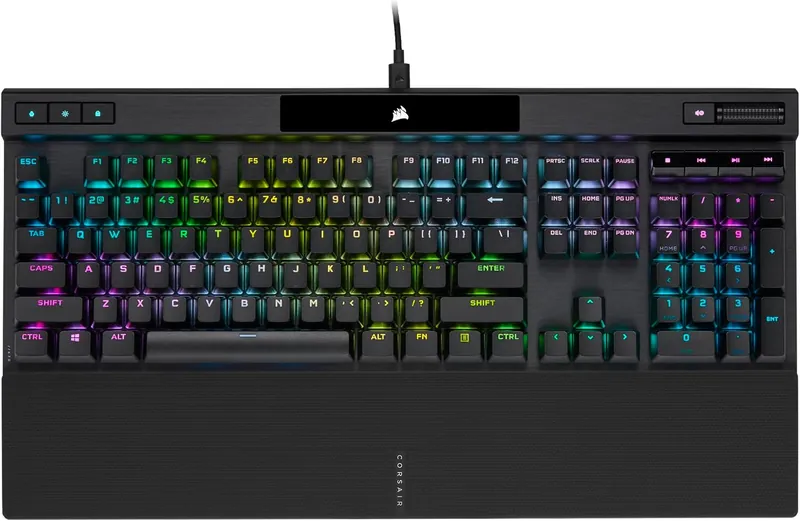
Long-time readers will remember that the K70 RGB MK.2 used to sit at the top of this list. Corsair has since retired that board, and its direct successor, the K70 RGB PRO, takes the crown without breaking a sweat. Everything we loved about the old K70 is still here: the sleek full-size layout, the aluminum frame, the full array of RGB, and authentic Cherry MX Red switches.
What’s new is the speed. The K70 RGB PRO polls at 8,000 Hz thanks to Corsair’s AXON hyper-processing, so every keystroke reaches your PC as fast as your hands can produce it. You also get double-shot PBT keycaps out of the box, which means no more shiny, greasy-looking keys after six months of ranked grinding. Your close-up cam will thank you.
If you are a gaming VTuber, you’ll appreciate the small quality-of-life touches too. The USB-C cable is detachable, there’s a dedicated tournament switch that kills the macros and flashy lighting for serious matches, and every key is programmable. The media keys and metal volume roller are perfect for controlling your background music mid-stream without alt-tabbing.
The Corsair iCUE software still has a learning curve. However, it’s pretty fun to play with once you get the hang of it, and the per-key lighting effects you can build in it look fantastic on camera.
Why Do We Recommend The Corsair K70 RGB PRO For Gaming VTubers?
At $84.99 the K70 RGB PRO gives you genuine Cherry MX switches, PBT keycaps, and class-leading polling in one gorgeous package. Especially if you prefer something other than a wireless keyboard, this is the board to beat. Take a look at the key switch guide at the bottom of this article, decide what your taste is when it comes to switches, and go for this keyboard. You can expect a premium experience with this one, making it the best gaming keyboard for VTubers!
Logitech G915 X Lightspeed: The Best Wireless Gaming Keyboard
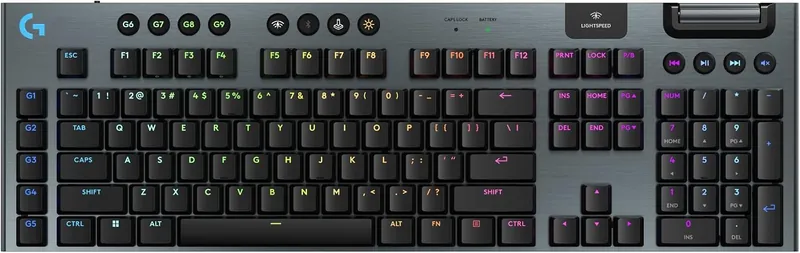
Before I say anything else about the Logitech G915 X Lightspeed, I need you to throw any preconceived notions about wireless peripherals out the window! The original G915 already proved that Lightspeed wireless is indistinguishable from a cable, and the G915 X carries that torch with the same lag-free 2.4 GHz connection, plus Bluetooth and USB-C wired modes when you want them.
The big upgrade over the old G915 is the keycaps. Logitech finally swapped the shine-prone ABS caps for double-shot PBT, so this board keeps looking fresh no matter how many hours you put into it. The slim aluminum-topped chassis still gives off that premium, elegant feel that made the original such a stunner on stream.
The low-profile GL switches remain the star of the show. They are very comfortable, fast to actuate, and the linear GL Reds in this model feel silky smooth in both games and long typing sessions. That makes this keyboard a reliable choice when you are in an ambush.
The other headline feature is KEYCONTROL, Logitech’s new remapping system in G HUB. You can stack up to 15 functions on a single key across layers, which is a dream for VTubers who juggle scene switches, soundboard triggers, and chat commands. It basically turns the whole keyboard into a giant stream deck. The only thing that would surely be a turn-off for many mainstream gamers is the $259.99 price tag, but the features and battery life justify it.
Why Do We Recommend The Logitech G915 X Lightspeed For Gaming VTubers?
The Logitech G915 X Lightspeed is an excellent choice for VTubers who prefer their table to be free of wires. Also, some of us just like to lean back in our chairs, relax, and enjoy our favorite casual game. You’ll need a really long cable for that, or you can go wireless. Personally, I would go for the later choice. This keyboard has everything a great wired keyboard should have, and on top of that, it’s wireless with great battery life and KEYCONTROL macros for your stream. That makes it the best wireless keyboard for gaming VTubers!
Razer Huntsman V3 Pro: The Fastest Gaming Keyboard
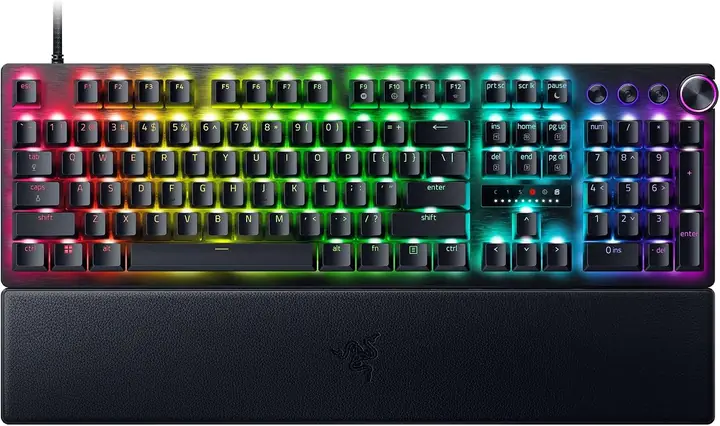
The Huntsman V2 held this spot for years, but Razer has moved on, and so have we. The Huntsman V3 Pro is the new speed king, and this time the speed claims are not a gimmick. Its second-generation analog optical switches let you set the actuation point of every single key anywhere from a hair-trigger 0.1 mm down to a deliberate 4.0 mm.
The real magic is Rapid Trigger. With it enabled, a key resets the moment you start lifting your finger instead of at a fixed point, so you can spam movement keys and ability rotations faster than any traditional switch allows. Combine that with Snap Tap, which instantly prioritizes your most recent directional input, and your counter-strafing in shooters gets noticeably crisper. These are the same features tournament players obsess over, built right in.
The analog side is still here too. Because the switches sense exactly how far each key is pressed, they can emulate a controller joystick: press lightly to walk, push deeper to sprint. You can even bind two different actions to one key at two different depths. For VTubers who bounce between racing games, shooters, and platformers on stream, that flexibility is fantastic.
Build quality is exactly what you’d hope for at this price: an aluminum top plate with zero flex, doubleshot PBT keycaps, a multi-function media dial, and a plush magnetic wrist rest for long streams. Just be ready to pay for all of it, because at $169.99 this board is not cheap at all!
Why Do We Recommend The Razer Huntsman V3 Pro For Gaming VTubers?
VTubers who stream competitive titles should put the Huntsman V3 Pro at the top of their list. Rapid Trigger and adjustable actuation give you a genuine mechanical edge in shooters, while the analog switches make controller-style games playable without reaching for a gamepad. Add in the most comfortable wrist rest we have tried in this class, and you have the fastest keyboard your viewers will ever hear you gush about!
Turtle Beach Vulcan II Max: The Best Mechanical Keyboard For Gaming VTubers
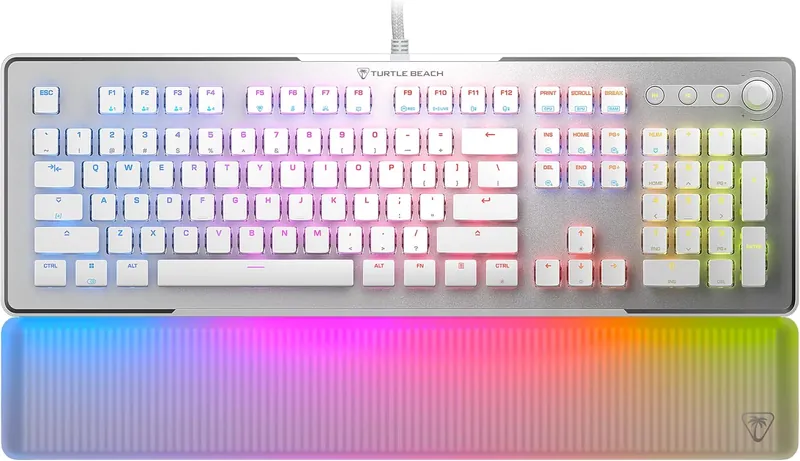
Quick history lesson: Turtle Beach retired the ROCCAT brand, so the Vulcan II Max we’ve been recommending for years now ships with a Turtle Beach badge instead. Same board, same light show, new name. And what a light show it is; this is still the best RGB we’ve ever seen on a PC peripheral! The translucent wrist rest diffuses the light and glows, the keycaps are intentionally thin, and the switches are tall and transparent so the RGB spreads beautifully under every cap.
The absurd amount of RGB doesn’t mean the keyboard looks bland without it. As a matter of fact, it has a very elegant and minimalistic design that looks very attractive even with the lighting off, and the White colorway we’ve linked absolutely pops on stream. If you are not a fan of RGB lighting, this keyboard is still a great choice for you.
Under the caps you get Turtle Beach’s Titan II optical switches, linear and rated for a ridiculous 200 million keystrokes. Optical actuation means the keypress registers by breaking a beam of light, so it’s fast, consistent, and there’s nothing mechanical to wear out. The low-profile caps also support third-party options, so if plain white ABS keycaps aren’t your style, you can just buy some custom keycaps, slap them on this keyboard, and you’ll be good to go.
The Swarm II software gives you full control over profiles, lighting, and the dual-function smart keys, and it still comes with pre-loaded macro settings for popular games, making it very easy to apply macros in your favorite game compared to any of its competitors. At $196.26 this much keyboard for this little money is a steal.
Why Do We Recommend The Turtle Beach Vulcan II Max For Gaming VTubers?
Gaming VTubers who like RGB and want their streams to look nice should definitely check out the Turtle Beach Vulcan II Max. The RGB on this thing will certainly turn your gaming room into a nightclub! And the quality of the Titan II optical switches is so good that you’ll never drop a keystroke while playing your favorite game!
SteelSeries Apex Pro Gen 3: The Best Full-Size Analog Keyboard For VTubers
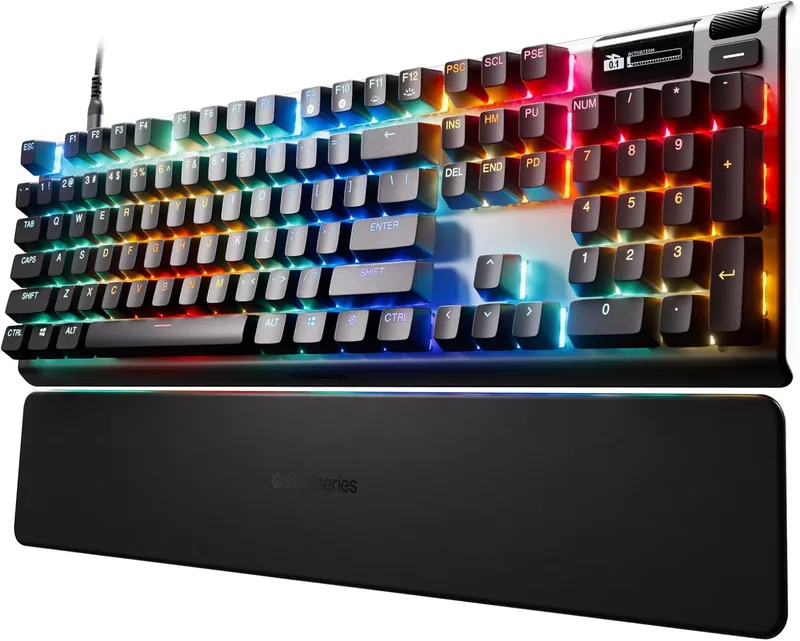
This slot used to belong to the budget-friendly Apex 5, but SteelSeries discontinued its hybrid switches years ago. Its modern heir is the Apex Pro Gen 3, and while it plays in a much higher price bracket at $158.95 it’s also a completely different class of keyboard. The OmniPoint 3.0 magnetic switches let you set the actuation of every key anywhere from a featherlight 0.1 mm to a deep 4.0 mm, and you can even assign two actions to one key at two different depths.
Like the Huntsman V3 Pro above, the Apex Pro Gen 3 packs Rapid Trigger for instant key resets and adds Rapid Tap for razor-sharp directional swaps, so it trades blows with anything on this list in raw speed. Where it pulls ahead is stream utility: the OLED smart display returns, and it can show your Discord notifications, Spotify track, or a custom animation while you play.
That little screen was always the fan-favorite feature of the Apex line, and it’s genuinely useful mid-stream; you can check what’s playing or tweak your actuation profile without ever alt-tabbing away from your game. The RGB lights are not too flashy, but they look pretty decent and aren’t over the top. The build quality is excellent and gives off a premium vibe, right down to the included magnetic wrist rest.
Why Do We Recommend The SteelSeries Apex Pro Gen 3 For Gaming VTubers?
If you want one full-size keyboard that does absolutely everything, the Apex Pro Gen 3 is it: adjustable magnetic switches for sweaty ranked sessions, an OLED screen for stream info, and a numpad for everything else. It costs real money, but you’re getting SteelSeries’s flagship tech in return. And if your wallet is screaming right now, don’t worry, our new budget pick at the end of this list has you covered!
SteelSeries Apex Pro Mini Gen 3: The Most Customizable Keyboard
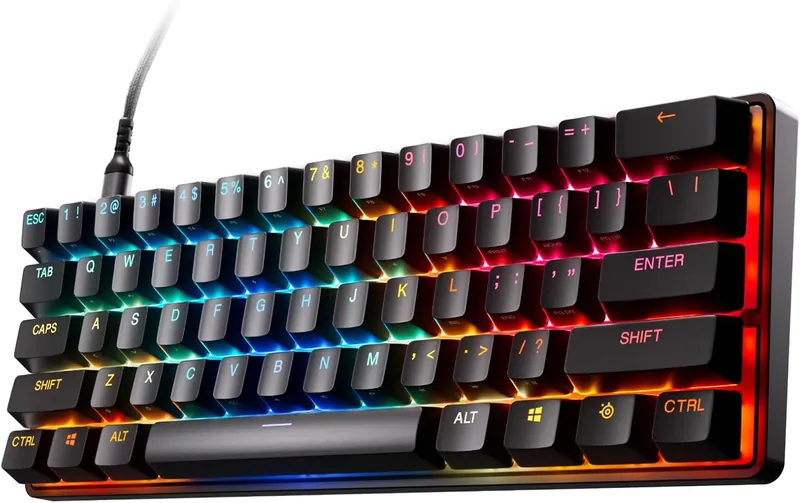
Our 60 percent slot gets a generational upgrade: the SteelSeries Apex Pro Mini Gen 3. It keeps the tiny footprint we loved in the original Mini and swaps in the same OmniPoint 3.0 magnetic switches as its big full-size sibling above. That means per-key adjustable actuation from 0.1 mm to 4.0 mm, dual actions on a single key, plus Rapid Trigger and Rapid Tap for the fastest inputs a 60 percent board can deliver.
One honest heads-up: this generation is a wired board, connecting over a braided detachable USB-C cable. SteelSeries hasn’t shipped a wireless Gen 3 Mini, so if a cable-free 60 percent setup is a dealbreaker for you, the older Apex Pro Mini Wireless is still out there. For everyone else, wired means zero charging anxiety mid-stream and the most stable connection possible, and honestly one thin cable is easy to hide on camera.
The extremely small form factor has a learning curve, so the user has to spend some time learning to use this keyboard if they haven’t had a 60 percent gaming keyboard before. But that small footprint is exactly the appeal: it frees up a huge amount of desk space for your mouse and makes your whole setup look a lot cleaner on stream.
The actuation point can go as low as 0.1 mm, which is the shallowest setting on any board in this list, registering even the lightest brush of a fingertip. Dial it deep for typing out chat replies, dial it shallow for ranked, and save both as profiles you can flip between instantly.
Why Do We Recommend The SteelSeries Apex Pro Mini Gen 3 For Gaming VTubers?
If you are a VTuber, and a loaded one because this keyboard costs $199.99 and you want your setup to look clean, the Apex Pro Mini Gen 3 is a clear winner for you. It’s the most compact keyboard on this list, and you can’t go any smaller than this and call that thing a keyboard. Maybe a calculator, but not a keyboard! Also, it’s sleek, it’s stylish, and it packs the most adjustable switches in the business; what more can you ask for?
Logitech G PRO X TKL Lightspeed: The Best Tenkeyless (TKL) Keyboard For Gaming VTubers
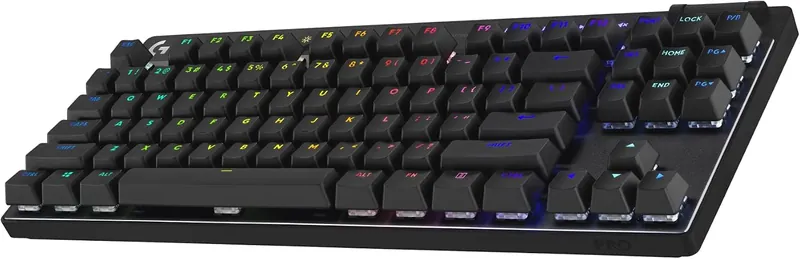
Rounding out our esports corner is the Logitech G PRO X TKL Lightspeed, the modern successor to the old wired G PRO that lived on this list for years. It’s one of the most widely used gaming keyboards in the professional eSports scene. The reason behind that is its simplicity and reliability. You know when Logitech puts their name behind anything, they deliver.
The upgrades over the old G PRO are exactly the ones we wished for. The mushy Romer-G switches are gone, replaced by proper GX Red linears. The dated micro-USB port is gone too; you now get Lightspeed wireless, Bluetooth, and wired USB-C in one board, so you can pair it to three devices and hot-swap between them. The ABS keycaps got upgraded to double-shot PBT, and dedicated media controls plus a volume roller landed along the top edge.
Logitech even includes a hard carrying case, because this board is built to travel to LANs and tournaments. The RGB looks great, and you can save your lighting to an on-board profile, so whenever you hook up your keyboard to any device other than your home computer, the lighting will be the one you preset, not the default rainbow.
Why Do We Recommend The Logitech G PRO X TKL Lightspeed For Gaming VTubers?
If you plan to stream eSports titles like Valorant, Dota, League of Legends, or CS2 as a VTuber, then this keyboard is a must. More than anything else, the G PRO line has become a statement in the eSports scene. Just by looking at your keyboard, your fans would be able to tell that you are an eSports player yourself! Other than that, it’s compact, reliable, and now completely wireless at $189.99 making it an obvious choice for our list of the best gaming keyboards for VTubing!
Corsair K70 CORE RGB: The Best Budget Keyboard For Gaming VTubers
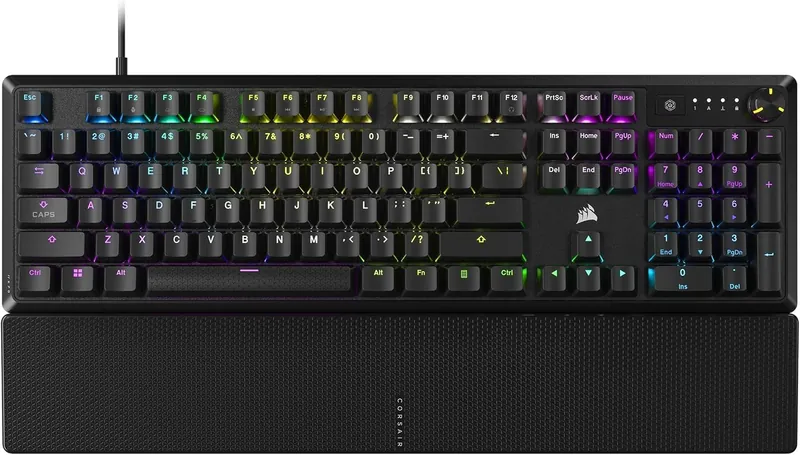
New to this year’s list is our budget pick, the Corsair K70 CORE RGB, and at $84.99 it punches so far above its weight that it made choosing it easy. You get the K70 family design and full per-key RGB, but the switches are the story here: Corsair’s MLX Red linears come pre-lubed from the factory, so they feel smooth and consistent in a way keyboards at this price simply didn’t a few years ago.
Here’s the part that matters most for streamers: the K70 CORE has two layers of sound dampening built into the case. Every VTuber knows the pain of a hot mic picking up machine-gun keyboard clatter over your commentary. This board turns that racket into a soft, muted thock that your noise suppression can actually handle. Your chat hears you, not your keystrokes.
You also get a multi-function rotary dial in the top corner for volume and media control, and full iCUE support, so your lighting can match the rest of your Corsair gear. The keycaps are ABS rather than PBT, which is the one obvious cost-cut, but they are easy to swap later since the switches take standard caps.
Why Do We Recommend The Corsair K70 CORE RGB For Gaming VTubers?
If you are just starting your VTubing career and every dollar counts, the K70 CORE RGB is the smartest $84.99 you can spend on your setup. It’s quiet enough that your mic won’t fight your keyboard, smooth enough that ranked games feel great, and pretty enough that your stream still gets the RGB glow. That’s the whole budget checklist, ticked!
How To Choose The Best Gaming Keyboard
These terms have been used throughout this article. So, if you are unfamiliar with any of these terms, give them a read so it will be helpful for you to choose the best keyboard for gaming VTubers.
Switch Specs
- Key Travel: This is the distance from when the key is at rest to the bottom when it is pressed. Our tests found that the lower the key travel, the faster the gaming keyboard is.
- Actuation Point: This is the distance that a switch needs to travel in order to be activated. Again, the lower this number is, the faster that specific keyboard will be.
- Reset Point: It’s the position when the switch has retracted enough to be actuated again.
- Tactile/Clicky Position: The point where you feel the feedback of the key is actuated.
- Actuation Force: The force required to pass the actuation point. These values are associated with light, medium, and heavy switches.
Types Of Switches
The following are the most common switches that can be found in gaming keyboards:
- Cherry MX Red: These switches fall in the “linear” switch category, meaning they are smooth and do not offer a tactile feel. However, they are pretty easy to press.
- Cherry MX Low Profile: These are my favorites for gaming. These switches are like the Cherry MX Red on steroids; they offer all the benefits of the Cherry MX Red while having the lowest key travel out there, i.e., 3.2mm, as opposed to the 4mm found in most mechanical keyboards.
- Cherry MX Blue: The Cherry MX Blue switches are bumpy, loud, and have a clicky feel; hence, they fall into the “clicky switches” category. Also, they are the most common switches used in mechanical keyboards.
- Cherry MX Brown: These switches have a tactile feel which means that upon pressing, they feel bumpy halfway through their travel time. This bump represents the actuation of the key. Hence, the key doesn’t need to be fully pressed to register.
- Optical Switches: Some keyboards mentioned in this article feature optical switches. These switches operate on a laser mechanism, instead of a mechanical one. When a user presses a button, it cuts off the light passing through underneath that switch. And once that happens, the switch is actuated. This mechanism is employed to achieve the fastest registration possible. That’s why the keyboards that feature these kinds of switches are the fastest out there.
Some Interesting Terms
- Hot-swap: It simply means that switches are removable from the PCB and can be swapped with other flavors of switches. Hot-swap keyboards are desirable because users can change how their keyboard buttons feel and sound. If they find themselves bored with their current ones, they can swap them for some other variety. Broken switches can also be replaced on a hot-swappable keyboard.
- Fast Gaming Switches: All it means is that the actuation point on the switch is high, usually around 1 mm. That way, when a user presses a button, the registration happens a lot faster than with a common 2mm or 4mm actuation point keyboard. For example, the Cherry MX Speed Silver switches have an actuation point of 1.2 mm. So you have to lightly tap the key and be speedy with the switches.
- Key-rollover: This is also known as N-key rollover. It basically represents how many keys can be registered simultaneously.
- Polling Rate: This represents how many times your keyboard is sending signals to your computer. 1000 Hz represents 1 ms response time, and frankly, anything faster than that is just a marketing gimmick and doesn’t improve your gaming experience.
Wrapping It Up
With the help of this buying guide, you’ll be able to understand what the requirements are for a keyboard to be the best at gaming. Also, you’ll be able to pick the best keyboard for gaming VTubers. Each one of the gaming keyboards listed here is the cream of the crop, but my favorite one is, and will be for the foreseeable future, the Logitech G915 X Lightspeed. That’s because of its battery life, stylish design, and durability.
Good luck with your VTubing careers!